Regulation Basic
Internet Borwser Configuration for QUEST3+ System
Written by Jauze · 6 September 2018
QUEST3+ System is only compatible with Google Chrome & Mozilla Firefox Version 45 to version 51. Please uninstall Firefox version 52 and above and reinstall with following firefox version :
| No. | Document Name | Download | User Manual |
|---|---|---|---|
| 1 | Firefox Version 51.0 Windows | DOWNLOAD | VIEW / DOWNLOAD |
| 2 | Google Chrome latest version | DOWNLOAD | VIEW / DOWNLOAD |
How To Disable Auto-Update on Firefox
Firefox occasionally checks to see if any updates are available for itself and for your search engines. To disable these checks:
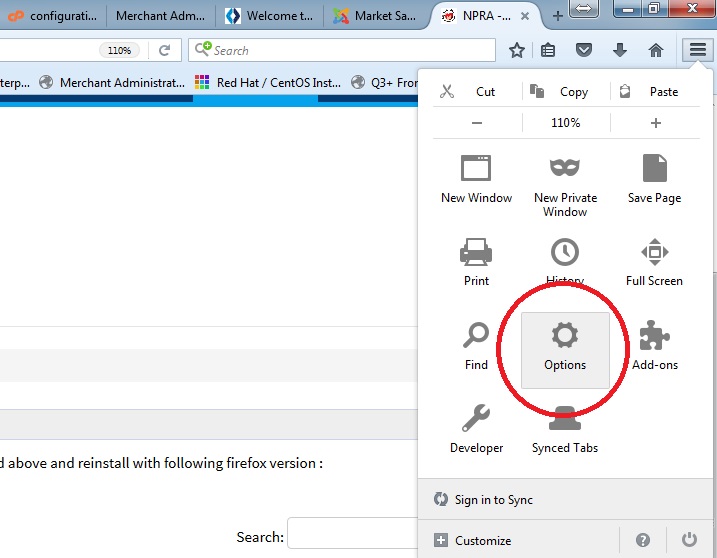
- Click the menu button and choose Options.
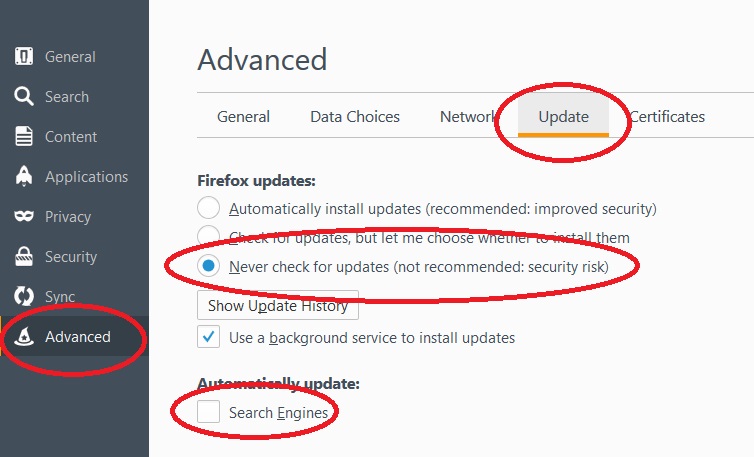
- Select the Advanced panel.
- Select the Update tab.
- Check Never check for updates (not recommended: security risk) and uncheck Search Engines.
- Close the about:preferences page. Any changes you've made will automatically be saved.